
What is a Sponsored Post?
A sponsored post is a post on a website or blog which is paid for by an advertiser. Sponsored posts are viewed by some people as a legitimate advertising method, while others believe that they can be somewhat misleading, and they can compromise the integrity of a website. A number of advertising companies offer sponsored post services which connect advertisers with willing authors, and some companies also reach out directly to websites which are read by their target audience. When the owner of a website is ethical, he or she clearly identifies sponsored posts. The content of such posts varies; a sponsored post may, for example, review a product, or discuss a company's offerings. In other instances, website owners simply embed advertisements from sponsors in posts which are related to their products, differentiating such advertising from sidebar or banner ads elsewhere on the site, and sometimes charging a premium for it. Some bloggers make sponsored posting into a very profitable venture, monetizing their blogs very effectively. Others may use it to create a small supplemental income which helps to pay for site maintenance and special projects. It is common to see sponsored posts combined with other forms of advertising; for advertisers, the advantage of sponsored posts is that they show up in site feeds, ensuring that they reach all viewers of a site, not just those who visit the main page. Opposition to sponsored posts can also be found in the blogging community. Some people argue that when bloggers write paid content, it compromises the rest of the content on their sites; for example, an author who writes a sponsored post about diet pills might be reluctant to criticize the diet industry. Others simply find sponsored posts irritating, especially when they deviate radically from the rest of the blog's content, and some blogs certainly do lose readers by going overboard with sponsored posts. There are also ethical issues involved; for example, when a sponsored post is not identified, readers may not realize that the author has been paid or otherwise compensated to endorse a product. The revenue from sponsored posts varies. As a general rule of thumb, the bigger the website, the greater the profit, because advertisers will pay more to sites with more readers. Smaller websites may be offered free products or smaller incentives, with advertisers hoping to reach niche readerships with a minimal outlay of money or goods. By : www.wisegeek.com
What is Google Adsense?
Google AdSense is an advertising program that was launched in the middle of 2003 by Google, the popular search engine. Google acts as an intermediary between a vast number of advertisers and an equally impressive number of website owners.
Advertisers sign up with Google and create text ads that they would like to be displayed. Google displays these ads on the results pages of searches that people conduct from Google.com. The Google AdSense program allows these advertisements to show up on pages all over the internet. To see some of the ads themselves, take a look at the sidebar on this page. The webmaster simply places a special code in their page and Google AdSense takes care of the rest. Perhaps the most valuable aspect of the system is that robots (specialized computer programs that scan internet pages) analyzes pages that ads will be placed on to determine which ads are most relevant to the page's content.
The relevancy of ads placed by AdSense varies on all sorts of criteria, but most ads are usually very relevant to the page on which the ad is displayed. For example, the ads on this page should be related to the internet, advertising, and/or the Google AdSense program itself.
Advertisers pay Google a certain amount for each time one of their ads are clicked. Google keeps a portion of this payment and passes on the rest to the owner of the website itself. Page views of the advertisements are irrelevant in terms of generating revenue in the program - commissions are only generated when internet users actually click on the ads themselves.
Google AdSense checks are sent out on a monthly basis. Many webmasters wait in anticipation of their checks since AdSense provides them a simple way to recoup some of the losses associated with posting websites on the internet. In some cases, webmasters can even make a profit using Google AdSense.
Outside of a Google AdSense Check:
Using the Competitive Ad Filter with AdSense for feeds
First, Happy New Year to everyone from AdSense for feeds and FeedBurner teams here at Google.
Second, this is a quick one - but we get asked this a lot, so we thought we'd cover it.
If you currently use the Competitive Ad Filter with AdSense for content, you may also wish to use it with AdSense for feeds. In order to provide publishers with ultimate control, the filter for AdSense for feeds is separate from that of AdSense for content, but operates in the exact same manner.
To block competitors ads from showing in AdSense for feeds, login to your AdSense account, go to the AdSense setup tab, and select Competitive Ad Filter. Then make sure you have selected the tab marked "AdSense for Feeds" and enter the domains or partial domains into the text box.
By : adsenseforfeeds.blogspot.com
Intro to Feed Placements

By : adsenseforfeeds.blogspot.com
Ad Review Center is now available for Feeds

The Ad Review Center (ARC) will give you more transparency and control by enabling you to approve or disapprove placement targeted ad creatives before they appear in your posts.
To get started with this tool, please login to your AdSense account. You will find ARC in the ‘Competitive Ad Filter’ section located under the ‘AdSense Setup’ tab. If you are using your AdSense account for other products- content, mobile, or video- please make sure to select the Client-ID starting with ca-feed-pub.
In order to maximize your revenue, we suggest that you keep the default setting to, ‘Run ads immediately.’ This will allow ads to run without delay while still allowing you to login and review the ads at a later time. By selecting the ‘Hold ads’ option, you could potentially decrease your revenue. This option will hold ads from displaying for 24 hours, thus limiting the number of advertisers' driving up your auction price.
You will then have the ability to approve or block a specific ad or advertiser in general. These settings can be changed at any time. Please keep in mind that blocking ads will remove them from the auction and could impact your revenue.
For more information about using the Ad Review Center, please visit our Help Center.
By:adsenseforfeeds.blogspot.com
Redirecting your feed to maximize revenue potential
One of the most popular (and recurring) questions our publishers ask is, "How do I maximize revenue for AdSense for feeds and ensure my subscriber stats are as accurate as possible?" Some of you can recite the answers to these questions backwards and forwards (though we find typing it backwards is quite difficult, so we'll leave you to say that aloud). But for our many new publishers that are just tuning in, here's the recap.
Just setting up AdSense for feeds ad units in your AdSense account is not enough to start seeing traffic and revenue to your feeds. It's critical that 100% of your feed traffic be directed to the feed(s) you created in AdSense for feeds or your FeedBurner account. Luckily, this is fairly easy to do via two standard methods.
- Redirect your original feed. This is the recommended option for all publishers, but especially if you have an already established blog or feed that already has subscribers. This option ensures that all traffic gets funneled to the version that has both advertising and subscriber tracking enabled. We've detailed this process in this Help Center entry.
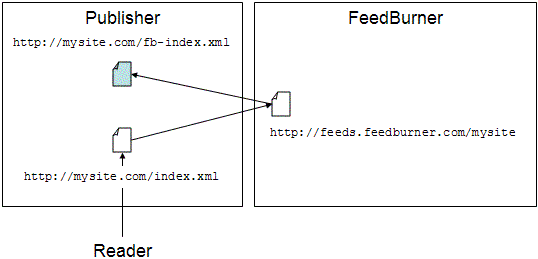
An added bonus: a plugin for self-hosted WordPress installations and feed-specific features within Blogger and TypePad make redirection much easier on these two publishing platforms. - Promote your feeds.feedburner.com feed. This is recommended only in the cases where you are setting up a new blog, or have an existing blog or feed that has no traffic. For example, if your feed is found at http://feeds.feedburner.com/toastforbreakfast, you would change your blog template to link only to this version of the feed. Note you have to make sure to change it not only where you promote your feed directly, but also everywhere you have feed autodiscovery links in your template. (One other place to keep in mind: BrowserFriendly.)
Hopefully, this reminder will help everyone get on firm ground with how to maximize traffic to their feed and revenue from it, too. In future posts, we will be covering how to increase traffic and subscribers to your feed, so hang on to your hat!
adsenseforfeeds.blogspot.com